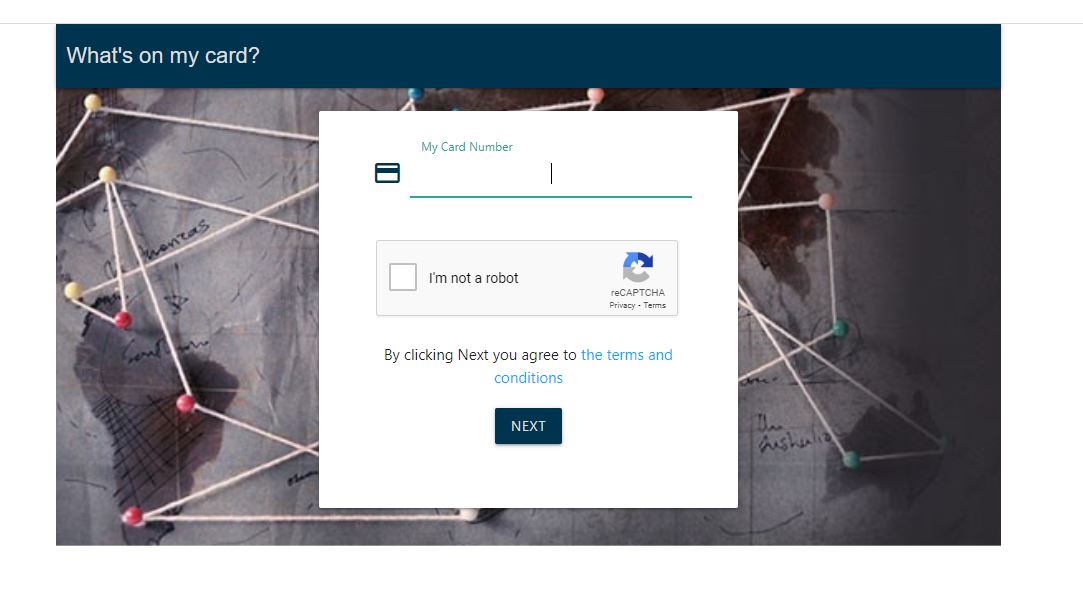
What’s On My Card South Africa is a card-balance checking service associated with prepaid, gift, reward and incentive cards used by consumers and organisations in South Africa. Instead of contacting the card issuer every time you want to know how much money remains on a card, an online balance-checking portal can provide access to available funds and, where supported, transaction information.
It is important, however, to understand what What’s On My Card South Africa actually does. It should not be treated as a universal balance checker for every South African debit or credit card. Traditional bank accounts with providers such as Absa, Capitec, FNB, Nedbank and Standard Bank are normally managed through the bank’s official app, internet banking, ATM or customer-service channels. What’s On My Card has historically been used particularly for prepaid and reward-card programmes.
South African organisations have published instructions directing cardholders to What’s On My Card for balance enquiries. For example, MTN South Africa has previously listed whatsonmycard.com as one of the ways certain promotional voucher-card holders could check available funds, while Goyisa provides the same balance-checking option for its promotional debit Mastercard.
What Is What’s On My Card South Africa?
What’s On My Card South Africa refers to an online service that allows eligible cardholders to check information associated with certain prepaid, gift, reward and incentive cards. Depending on the particular programme and issuer, this may include the remaining balance and transaction activity.
The service has also been associated with Tutuka Software, a South African prepaid-card technology provider. An archived listing for the former What’s on my card? Android application describes it as a tool for checking gift-card balances and transaction history, although that application is no longer available through Google Play.
Current South African card providers and shopping centres continue to reference the What’s On My Card service. For example, Cresta Shopping Centre directs gift-card holders to whatsonmycard.com for balance enquiries, while Cascades Lifestyle Centre lists it alongside telephone and SMS options for checking its gift-card balance.
How What’s On My Card South Africa Works
The basic idea is straightforward: the cardholder provides the identifying information requested by the relevant balance-checking service, the card is matched against the underlying card programme, and the available balance or supported account information is displayed.
This is different from a conventional bank balance enquiry. A bank app connects you to your banking profile and accounts, whereas a prepaid or incentive-card portal is normally tied to the specific card programme and its processing system.
What information do you need for What’s On My Card South Africa?
The information required depends on the card programme. Some cards may require the 16-digit card number, while another issuer may request an additional security detail or identification information. Kudosh, for example, provides a dedicated online statement facility that asks cardholders for their card number and ID number.
Do not assume that every card uses the same verification process. The safest approach is to follow the instructions printed on the card or supplied by the organisation that issued the card.
How to Use What’s On My Card South Africa
If your card issuer or programme specifically tells you to use What’s On My Card, the process is generally simple.
Step 1: Identify the card issuer
First, check who issued the card. Look at the front and back of the card, accompanying letter, SMS, email or promotional terms. This matters because not every Visa, Mastercard, debit card or store card is automatically supported by What’s On My Card.
Step 2: Use the balance-checking channel provided by the issuer
Where the issuer directs you to What’s On My Card, open the relevant online service and follow its instructions. Some card programmes also provide alternative channels such as SMS, USSD or telephone balance enquiries.
For example, published South African card instructions have included balance enquiries through What’s On My Card alongside SMS, USSD and call-centre options.
Step 3: Enter the requested card information
Enter only the information requested by the legitimate balance-checking page. Depending on the card, this could include the card number, an expiry date, a security code or another verification detail.
Never send your card number, PIN, CVV or one-time password to someone who contacts you unexpectedly on WhatsApp, SMS, email or social media. A balance enquiry should not require you to disclose sensitive authentication information to another person.
Step 4: Review the balance and transactions
If the card is supported, the service may show the available balance and, depending on the programme, recent transaction activity. Check that the displayed balance makes sense after your latest purchase or card load.
Some prepaid-card systems can provide transaction information in real time. PayDNA, for example, states that balance and transaction activity for its relevant card services are updated in real time.
Step 5: Compare the information with your receipt
If you have recently spent R250, for example, compare the transaction against the balance shown online. This can help identify an unexpected transaction, a delayed transaction or a discrepancy that needs to be reported to the card issuer.
Which Cards Can Be Checked With What’s On My Card South Africa?
The answer depends on the card programme rather than simply whether the card carries a Visa or Mastercard logo. What’s On My Card has been used for a range of prepaid, reward, promotional and gift-card products.
Examples documented by South African organisations include promotional reward cards, shopping vouchers and prepaid incentive cards. MTN’s published promotion terms have referred participants to What’s On My Card for certain shopping-voucher balance enquiries.
Retail and shopping-centre gift cards have also used the service. Cresta Shopping Centre, for example, tells gift-card customers that their balance can be checked through What’s On My Card.
Kudosh is another useful example. Uwin Iwin provides a dedicated “What’s on my Card” page for Kudosh Reward Card statements and allows cardholders to view their card statement online.
This means claims that What’s On My Card automatically supports every South African debit card, credit card, loyalty card and bank account should be treated cautiously. Always confirm support with the card issuer.
What’s On My Card South Africa vs Bank Balance Checking
One of the most common sources of confusion is the difference between a prepaid-card balance and a bank-account balance.
| Card or account | Recommended balance-checking method |
|---|---|
| Prepaid reward card | Use the issuer’s specified online portal or balance service |
| Gift card | Use the retailer, shopping centre or card provider’s official balance checker |
| Kudosh Reward Card | Use the Kudosh statement and balance facilities provided by Uwin Iwin |
| Bank debit card | Use your bank’s official app, internet banking, ATM or approved banking channel |
| Credit card | Use the issuing bank’s official banking platform or customer-service channel |
For example, if you want to know the balance of a Capitec, FNB, Nedbank or Standard Bank transactional account, the appropriate starting point is the bank itself rather than assuming that What’s On My Card can access it.
What’s On My Card South Africa and Gift Cards
Gift cards are one of the clearest use cases for online balance checking. A gift card may have been received months ago, and it can be difficult to remember how much remains after several purchases.
Some South African retailers operate their own balance-checking pages. Toys R Us South Africa, for instance, has a dedicated gift-card balance page where customers can enter their gift-card code to check the current balance.
This illustrates an important rule: use the balance-checking service specified by the card issuer or retailer. If the retailer provides its own official checker, that can be preferable to entering card information into an unrelated third-party website.
Is What’s On My Card South Africa Safe?
Security should be a priority whenever a website asks for payment-card information. The existence of a balance-checking service does not mean every website using the words “What’s On My Card” is legitimate.
Before entering card details, check that you have reached the correct service through a trusted source. Ideally, follow a link from the card issuer, retailer, shopping centre or organisation that provided the card.
There is evidence that the whatsonmycard.com domain continues to resolve and support HTTPS, although independent domain and infrastructure information should not be confused with an endorsement of every page claiming to be associated with the service.
Protect your card details
South Africans should be particularly cautious about phishing messages that promise rewards, refunds or “card verification”. Never provide your PIN or one-time password simply because a website claims that it is necessary to check a balance.
If you notice an unfamiliar transaction, contact the organisation that issued the card using contact information obtained from its official website or the documentation supplied with the card. Do not rely on a number supplied in a suspicious SMS or social-media message.
What to Do If What’s On My Card Does Not Show Your Balance
A failed balance enquiry does not necessarily mean that your card has no funds. Several other explanations are possible.
- The card may not be supported by the service.
- The card may not have been activated.
- The card number may have been entered incorrectly.
- The card may have expired.
- The card programme may have changed its balance-checking provider.
- The online service may temporarily be unavailable.
- The card may have been blocked because of suspected fraud or another issuer decision.
For example, Uwin Iwin states that a Kudosh card must be activated before it can be used and that cardholders can access balance information through its “What’s on my Card” service.
If an online check fails, look at the back of the card for the issuer’s customer-service details or return to the website of the organisation that gave you the card.
What’s On My Card South Africa for Lost or Stolen Cards
A balance checker is not a substitute for reporting a lost or stolen card. Treat a prepaid or gift card with the same care you would give cash.
If your card is lost or stolen, contact the issuer as soon as possible and ask whether the card can be blocked. Some providers have specific replacement procedures. For example, adumo’s published gift-card FAQ advises customers to report lost or stolen cards immediately and explains its replacement process.
Keep the original card documentation and purchase receipt where possible. These records may help the issuer verify ownership or investigate a dispute.
What’s On My Card South Africa: Fees and Transaction Checks
The balance-checking website itself should not automatically be assumed to be a paid banking service. However, the underlying card programme may impose charges for particular services, such as SMS or USSD enquiries, replacement cards, inactivity or other account-related services.
For example, published South African reward-card terms have included fees and expiry conditions that are specific to the particular card programme.
Before using an SMS or USSD balance enquiry, check the applicable terms because mobile-network or value-added-service charges may apply. If cost matters, an online balance enquiry may be more convenient where the issuer provides it at no charge.
How South Africans Can Get More Value From Prepaid Cards
Checking a balance is useful, but it is only one part of managing a prepaid or reward card responsibly.
Check the balance before shopping
If you plan to spend R800 but your prepaid card has only R650 available, knowing this beforehand can prevent an awkward declined transaction at the till.
Check expiry dates
Some prepaid and promotional cards have fixed validity periods. Look at the expiry date printed on the card and read the terms supplied when the card was issued.
Review transactions periodically
Regularly checking transactions can help you identify purchases you do not recognise. Report suspicious activity promptly rather than waiting until the card expires.
Keep reward cards separate from bank cards
A reward or prepaid card may have different rules from a normal bank account. Keeping track of the issuer, balance, expiry date and applicable fees makes it easier to avoid unexpected problems.
Frequently Asked Questions About What’s On My Card South Africa
1. What’s On My Card South Africa is used for what?
What’s On My Card South Africa is primarily associated with checking balances and, where supported, transaction information for participating prepaid, gift, reward and incentive cards. It should not be assumed to provide access to every South African bank account or credit card.
2. How do I use What’s On My Card South Africa to check a balance?
First confirm that your card issuer supports the service. Then use the balance-checking page specified by the issuer and enter the requested card information. Follow the on-screen instructions and review the displayed balance or transaction information.
3. Can What’s On My Card South Africa check my FNB, Capitec or other bank balance?
Not simply because the card is issued by a South African bank. Traditional banking balances should normally be checked through the relevant bank’s official app, internet banking, ATM or customer-service channel. What’s On My Card is more closely associated with particular prepaid, gift and reward-card programmes.
4. Is What’s On My Card South Africa safe?
Use caution whenever entering card information online. Access the service through a trusted link supplied by the card issuer or retailer, check that you are on the correct website and never disclose your PIN or one-time password to another person. If you are uncertain, contact the issuer directly.
5. What should I do if What’s On My Card South Africa cannot find my card?
Confirm the card number and check whether the card has been activated and is still valid. If the problem continues, contact the organisation that issued the card. It may have changed its balance-checking process or may use a different portal.
Conclusion: What’s On My Card South Africa Explained
What’s On My Card South Africa can be a convenient way to check the available funds and transaction activity associated with supported prepaid, gift, reward and incentive cards. South African shopping centres, reward programmes and card providers have historically directed customers to the service for balance enquiries, making it particularly useful for people who receive promotional or prepaid cards.
The most important point is to identify your card issuer first. Do not assume that every debit card, credit card, loyalty card or bank account can be checked through What’s On My Card. For bank accounts, use the bank’s official channels; for gift and prepaid cards, follow the balance-checking instructions supplied by the issuer.
By checking your balance before making a purchase, monitoring transactions, keeping your card details private and acting quickly when a card is lost or stolen, you can use prepaid and reward cards more safely and avoid unnecessary declined transactions or lost funds.
Sources and further reading include the official card and retailer guidance from MTN South Africa, Uwin Iwin, Cresta Shopping Centre and adumo Payouts, which provide examples of how particular South African card programmes handle balance enquiries, statements and card security.
Image Credit: makingsenseofmoola.com
